

That gap between "something broke" and "we know how to fix it" is where manufacturers bleed money. In large automotive plants, one hour of downtime now costs an average of $2.3 million, more than double what it cost in 2019, according to Siemens' 2024 True Cost of Downtime study.
Most plants don't have a documented answer sitting anywhere accessible. The fix lives in a veteran operator's head, a marked-up binder in the maintenance office, or a ticket buried in a system nobody searches. This article covers what a troubleshooting knowledge base actually is, the benefits it delivers, the components that make one work, and the best practices for building one that keeps production moving.
Key Takeaways
- Knowledge bases map symptoms to root causes and fixes, eliminating repeat diagnosis
- Well-built systems cut downtime, speed onboarding, and reduce reliance on "tribal knowledge" experts
- Strong knowledge bases share four traits: searchable structure, visuals, categorization, and regular updates
- Capturing knowledge during work, not after, keeps knowledge bases from going stale
What Is a Troubleshooting Knowledge Base?
A troubleshooting knowledge base is a structured, searchable repository that connects specific problems, symptoms, and error codes to their root causes and step-by-step fixes. It's different from a general FAQ-style knowledge base, which usually answers broad "how do I" questions.
A troubleshooting KB exists for one purpose: get a technician from "this machine is doing something wrong" to "here's exactly how to fix it" as fast as possible.
Known Error Knowledge Bases
Within a troubleshooting KB, you'll often find a specific subset called a known error database, a term borrowed from the ITIL service management framework. A known error is a problem with a documented root cause and a confirmed workaround or permanent fix.
Once an issue has been diagnosed and logged as a known error, no technician should ever have to re-investigate it from scratch.
That's the entire point: stop paying the diagnostic cost twice for the same failure.
This same structure applies whether or not an issue is formally logged as a known error. Basic troubleshooting knowledge typically includes three things:
- Problem identification – recognizing and describing the symptom accurately
- Root-cause analysis – using a systematic method, like 5 Whys or top-down/bottom-up testing, to isolate what actually caused it
- A documented resolution path – the verified steps that fixed it
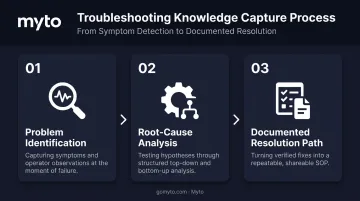
A knowledge base is simply the system that stores this knowledge and surfaces it the moment someone needs it, at the machine, not buried in a shared drive three clicks deep.
Key Benefits of a Troubleshooting Knowledge Base
Manufacturers that build a real troubleshooting knowledge base aren't just organizing information for its own sake. They're closing the gap between "problem happened" and "problem solved," and that gap is expensive.
Faster resolution and reduced downtime. When a symptom matches a documented fix, technicians skip the guesswork entirely. No calling around, no re-running diagnostic tests someone already ran six months ago. A 2023 ABB-commissioned survey of more than 3,200 plant-maintenance decision-makers found a median unplanned-outage cost of $125,000 per hour across industrial businesses, with two-thirds reporting outages at least monthly.
Preserves expertise before it walks out the door. Documented fixes protect against knowledge loss from retirements, turnover, and shift changes. This isn't hypothetical. Deloitte and The Manufacturing Institute project U.S. manufacturers will need 3.8 million new employees through 2033, with roughly 2.8 million of those openings driven by retirements alone.
Reduces escalations and dependency on senior staff. When documented fixes exist, frontline technicians resolve more issues on their own instead of waiting for the one senior engineer who "just knows" the machine, freeing that expertise for genuinely complex problems.
Improves consistency across shifts, lines, and plants. A shared knowledge base means the night-shift operator at 2 a.m. follows the same proven resolution path as the day-shift veteran, regardless of which building they're standing in.
Accelerates new hire onboarding. New technicians ramp up faster when they can reference real troubleshooting history instead of shadowing a tenured coworker for weeks. This pattern gets riskier as experienced staff retire faster than plants can replace them.
Compounds in value over time. Unlike a static manual that goes stale the day it's printed, a living troubleshooting knowledge base grows more accurate as teams log more real fixes. Every resolved ticket adds context that makes the next diagnosis faster.
Key Components of an Effective Troubleshooting Knowledge Base
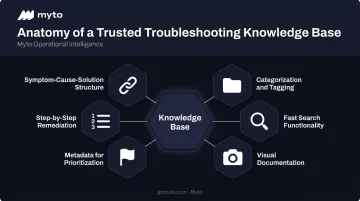
Not every knowledge base delivers value. The ones technicians actually trust share a specific set of components:
- Symptom-cause-solution structure – Every entry links the observed problem, diagnosed root cause, and exact steps that resolved it
- Categorization and tagging – Entries organized by machine type, error code, department, or severity let technicians filter fast under pressure
- Fast, reliable search functionality – Troubleshooting searches happen mid-crisis, not during a calm browse, so keyword and filtered search need to surface the right entry in seconds
- Visual documentation – Photos, diagrams, and short video clips capture spatial and sensory context text alone can't, and a 23-second clip of seating a spindle chuck beats three paragraphs of instructions
- Metadata for prioritization – Fields like frequency of occurrence, last-verified date, and severity help technicians triage and flag outdated entries
- Step-by-step remediation instructions – Fixes broken into clear, sequential steps any technician can follow, not just the person who originally solved it
Consider a well-built entry like this one:
SOP-MCH-042: Spindle Vibration Diagnostics – Pairs a quick-start checklist with likely root causes, such as inadequate lubrication intervals or coolant contamination, so nobody starts from zero.
This is where manual documentation usually breaks down. Someone has to remember to add photos, tag the entry, and note the parts used, on top of actually fixing the machine.
Myto's platform approaches this differently. Its wearable AI glasses capture the troubleshooting footage and audio as a technician works. The underlying agentic AI then structures that raw footage into a documented flow, visuals included, automatically.
Best Practices for Building and Maintaining Your Troubleshooting Knowledge Base
Building a knowledge base that gets used takes more than good intentions. These practices separate the ones that stick from the ones that quietly die in a shared drive.
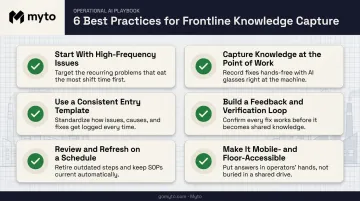
Start With Your Highest-Frequency, Highest-Cost Issues
Don't try to document everything at once. Pull maintenance logs or CMMS data and apply a Pareto approach: identify the small number of recurring problems causing most of your downtime. One SMRP-documented case at a gas compression plant found that prioritizing failures this way lifted plant availability from 83% to 97% in roughly a year, while cutting maintenance cost by 30%.
Capture Knowledge at the Point of Work, Not After
Documentation quality drops fast when technicians write things down hours or days later from memory. Details get flattened and the "why" behind a fix disappears.
This is exactly where hands-free capture changes the equation. Myto's wearable AI glasses record what a technician sees and says while solving the problem, without stopping to type or fill out forms.
The footage syncs automatically, and the platform structures it into a usable entry without the operator doing any extra work.
Use a Consistent Entry Template
Standardize fields across every entry:
- Symptom observed
- Root cause identified
- Fix applied
- Parts needed
- Time to resolve
Consistency makes entries scannable under pressure and easier to search later.
Build In a Feedback and Verification Loop
Let technicians flag entries that are outdated or wrong, and verify new fixes before they go live. A knowledge base full of unverified entries loses trust fast, and once techs stop believing it, they stop checking it.
Review and Refresh Entries on a Schedule
Equipment changes, part swaps, and process updates make static entries obsolete. A quarterly audit cadence works for most plants, layered on top of real-time feedback from the floor.
Make It Mobile- and Floor-Accessible
A knowledge base only helps if a technician can pull it up at the point of failure, not back at a desktop twenty minutes later. If your team can't carry tablets or stop to type, the system needs to meet them where they already are.
Common Challenges When Building a Troubleshooting Knowledge Base in Manufacturing
Frontline Resistance to Documentation
Operators under pressure to get a line running again rarely want to stop and write detailed notes, and that's a reasonable reaction. Manual documentation efforts often fail for exactly this reason, producing thin, inconsistent entries nobody trusts.
Knowledge Trapped in Silos
Tribal knowledge, paper binders, and disconnected legacy systems keep critical fixes locked inside a small circle of veteran staff. A 2019 Manufacturing Institute survey found 97% of manufacturers had at least some concern about this kind of brain drain, with nearly half very concerned.
Closing the Gap With AI-Driven Capture
AI-driven approaches are starting to close this gap by passively capturing operator expertise as it naturally happens, instead of asking anyone to change how they work.
Myto's agentic AI generates structured documentation and troubleshooting workflows directly from captured frontline activity, whether that's footage from AI glasses or patterns pulled from existing CMMS tickets and machine logs.
The write-up happens without anyone having to write it up. If you're evaluating how this fits your plant's equipment mix, booking a discovery call is the fastest way to see it against your own use case.
Frequently Asked Questions
What is the basic knowledge of troubleshooting?
Basic troubleshooting knowledge means identifying symptoms, isolating the root cause through systematic testing or elimination, and applying a verified fix. Most technicians follow a structured approach, either top-down or bottom-up diagnosis, rather than guessing.
What is a known error knowledge base?
A known error knowledge base is a specialized set of entries documenting problems that have already been identified, their confirmed root causes, and either a workaround or permanent fix. It exists so teams never re-diagnose the same issue twice.
What are the key components of a knowledge base?
Effective knowledge bases include categorized content, strong search functionality, visual aids like photos or short videos, a consistent entry template, and a regular process for updates and technician feedback.
How do you create a troubleshooting knowledge base from scratch?
Start by identifying your most frequent and costly issues using maintenance or CMMS data. Document each with a symptom-cause-fix structure, then build in a review process to keep entries accurate as equipment and processes change.
What's the difference between a troubleshooting guide and a knowledge base?
A troubleshooting guide is typically one document walking through a single process step-by-step. A knowledge base is the larger searchable repository containing many guides and entries across every machine and issue type.
How often should a troubleshooting knowledge base be updated?
Entries should be reviewed whenever equipment, parts, or processes change. Most plants supplement that with a quarterly audit schedule, plus real-time feedback from technicians who spot outdated information in the field.