Introduction
Ask ten technicians how they diagnose a failing motor, and you'll get ten different answers. Troubleshooting has long been treated as an art form, something you either "get" after twenty years on the floor or you don't.
That mindset is expensive. According to Siemens' 2024 digitalization report, unplanned downtime costs Fortune Global 500 companies $1.4 trillion annually, roughly 11% of their combined revenue.
Much of that cost traces back to a simple problem: troubleshooting still runs on trial-and-error and tribal knowledge locked inside a handful of senior technicians. When they're on shift, fixes happen fast. When they're not, everyone else guesses.
This guide breaks down what troubleshooting actually is and the systematic process behind it. You'll also find proven techniques that reduce repeat failures, common failure patterns to watch for, and how AI is starting to change the equation.
Key Takeaways
- Troubleshooting reacts to failures while maintenance prevents them; mature programs need both
- A repeatable process (identify, isolate, test, repair, verify) beats guesswork every time
- Root cause analysis and asset histories cut repeat breakdowns most effectively
- AI-powered capture is replacing static binders to preserve technician expertise
What Is Maintenance Troubleshooting?
Troubleshooting is the systematic process of finding the root cause of an unplanned asset failure when the answer isn't obvious. It's distinct from routine repair work because the problem hasn't been diagnosed yet — you're hunting for the cause, not just executing a known fix.
Picture a conveyor belt that suddenly stops mid-shift. Is it the motor, a jammed roller, a tripped sensor, or a torn belt? A technician has to work through possibilities systematically, ruling out causes one by one until the actual culprit surfaces.
Why this matters more than most plants realize:
A 2024 lab study testing CNC-machine diagnostics found completion times ranging from 389 seconds with no support to 563 seconds when technicians relied on generic AI tools that added extra steps without factory-specific context. Fault-tree guidance landed in between at 477 seconds.
The gap between the fastest and slowest approach was nearly three minutes per single fault. That's in a controlled lab, not a live production line, where every minute of downtime compounds.
Common Triggers That Demand Troubleshooting
Certain symptoms almost always signal it's time to start a diagnostic process rather than a scheduled task:
- Unusual noise or vibration from rotating equipment
- Fluid leaks (hydraulic, coolant, lubricant)
- Product quality defects appearing without a known cause
- Jamming or intermittent stoppages
- Complete functional failure with no warning
Spotting these triggers early narrows the search before it starts. The next step is applying a structured method to pinpoint the cause quickly.
Troubleshooting vs. Maintenance: What's the Difference?
These two terms get used interchangeably on the floor, but they describe opposite ends of the reliability spectrum.
Maintenance is scheduled and preventive: lubrication rounds, inspections, calibrations, and time-based part swaps designed to stop failures before they happen. Troubleshooting is reactive and diagnostic, triggered only after something has already gone wrong.
Here's the distinction in practice:
| Aspect | Maintenance | Troubleshooting |
|---|---|---|
| Timing | Scheduled, proactive | Unplanned, reactive |
| Trigger | Calendar or usage cycle | Symptom or failure |
| Goal | Prevent failure | Diagnose and resolve failure |
| Skill focus | Procedural execution | Logical deduction |
Strong preventive maintenance shrinks how often troubleshooting incidents occur, but it never eliminates them entirely. Even the best-lubricated, best-inspected line will eventually throw a curveball nobody scheduled for: a sensor that fails randomly, a part that wears faster than its rated life, an operator error. That's when troubleshooting takes over.
The Systematic Troubleshooting Process: Step-by-Step
The Instrumentation, Systems, and Automation Society describes troubleshooting as an orderly process: observe and gather information, use symptoms and logic to identify causes, then implement a corrective fix. In practice, that breaks into five working steps.
Gather information. Talk to the operator or supervisor who witnessed the failure. Note the symptoms: unusual noise, smell, vibration, or a sudden performance drop. Ask what conditions existed right before the failure.
Isolate the probable cause. Combine what you just learned with asset knowledge and historical records. A machine with three prior bearing failures points you somewhere specific, fast.
Formulate and test a hypothesis. Swap a suspect part, bypass a component, or simulate the fault to confirm your theory before committing to a repair. ISA's guidance is blunt here: change one thing at a time, and don't replace parts on a guess.
Repair or replace. Once the hypothesis holds up, implement the fix using the correct parts and procedure, not a workaround that'll fail again next month.
Test the full system and verify. Confirm the original symptom is genuinely resolved. If it's not, you go back to step one.
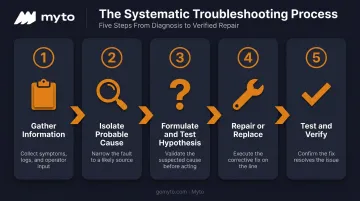
Steps 1 through 3 often repeat several times before you land on the real cause. Documenting each pass matters: without a record of what you've already ruled out, the next attempt, or the next technician, starts from zero.
Platforms like Myto's AI system capture that troubleshooting history automatically, so the context carries over even when the person tackling the next shift wasn't there for the first attempt.
Proven Troubleshooting Techniques and Best Practices
Beyond the basic process, a handful of techniques separate teams that fix problems once from teams that keep fixing the same problem monthly.
Root Cause Analysis
The 5 Whys method pushes past the obvious symptom by repeatedly asking why until you hit the actual driver. A fishbone (Ishikawa) diagram does similar work visually, organizing possible causes into categories so nothing gets missed.
Here's how that plays out on a real breakdown chain:
Bearing failure → caused by shaft misalignment → caused by a missed alignment check → caused by a scheduling gap in the PM calendar.
Fix the bearing, and you've solved nothing. Fix the scheduling gap, and you've prevented the next five failures.
Document and Standardize the Process
Searchable histories, standardized codes, and explicit SOPs turn diagnosis from guesswork into a repeatable process:
- Searchable asset histories: Log every breakdown, repair, and abnormal behavior so technicians can cross-reference past incidents instead of starting cold.
- Standardized failure codes: Categorize problems quickly and pull up common fixes instead of reinventing the diagnosis each time.
- Explicit SOPs: Break inspections and repairs into ordered steps to reduce missed actions, especially for solo or less experienced technicians.
The Knowledge Loss Problem
None of this matters if the knowledge stays trapped in one person's head. A Manufacturing Institute survey of 302 manufacturing companies found 97% identified "brain drain" (the loss of institutional and technical knowledge) as a concern, with 49% very concerned. Only 61% had mentorship programs in place to counter it.
This is the exact gap Myto was built to close. Its wearable AI glasses passively capture how a senior technician diagnoses a spindle vibration issue or hears a bearing about to fail, with no clipboards and no extra data entry needed. That footage gets structured automatically into SOPs and troubleshooting flows, so the knowledge gets preserved before it walks out the door at retirement.
Common Causes of Equipment Failure to Watch For
Most breakdowns aren't mysterious once you know the usual suspects. Recognizing these patterns speeds up the isolation step dramatically because you're pattern-matching instead of starting from a blank slate.
The most frequent root causes maintenance teams encounter:
- Contamination — dirt, debris, or fluid ingress reaching internal components
- Poor lubrication — wrong lubricant, wrong quantity, or missed intervals
- Operator error — incorrect setup, overloading, or skipped steps
- Overheating — friction, poor ventilation, or electrical faults
- Wear and fretting — normal degradation accelerated by misalignment or vibration
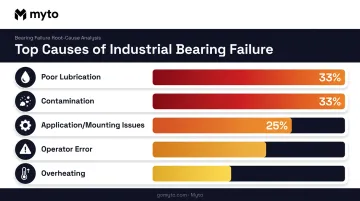
SKF's failure analysis of industrial bearings found lubrication problems and contamination each account for roughly one-third of failures. Application or mounting issues cause another quarter, though the split varies by industry.
Fault-detection technology catches these before they escalate:
- Vibration monitoring flags bearing faults, imbalance, and mechanical looseness early
- Thermal imaging reveals loose electrical connections and abnormal friction heat
- Condition sensors track degradation trends over time, not just point-in-time snapshots
McKinsey reports predictive maintenance programs typically cut downtime by 30% to 50% and extend machine life by 20% to 40%. Catching the pattern early beats troubleshooting the full breakdown later.
How Technology and AI Are Transforming Maintenance Troubleshooting
CMMS platforms already changed one part of this equation. Centralizing asset histories, manuals, and failure codes means technicians aren't digging through binders mid-repair anymore. That's a real improvement, but it's still a passive system. It only stores what someone deliberately typed in.
The next evolution is capturing knowledge without asking anyone to write it down.
AI wearables now record how experienced technicians actually diagnose and fix problems in real time, with zero extra data entry. This is where platforms like Myto come in. The glasses run in hands-free continuous capture mode, syncing footage and audio automatically to the platform, which then structures it into:
- Standard operating procedures tied to specific machines and failure modes
- Troubleshooting flows built from what actually worked, not theory
- Shift-handover notes an incoming lead will actually read
- Training content for new operators learning the same equipment
Agentic AI takes it a step further. Rather than just storing information, it surfaces the right troubleshooting context at the exact point of failure. It pulls equipment history, loads the relevant SOP, and suggests likely root causes based on what's happened on that machine before.
It can also open a maintenance ticket automatically, document the resolution path, and draft the shift-handover note so nothing gets lost between crews.
None of this requires ripping out existing systems. Myto's Operational Data Integration layer sits alongside MES, SCADA, CMMS, and ERP platforms, reading tickets, machine logs, and quality data through what amounts to a manufacturing lens. It maps which log belongs to which machine and which ticket connects to which SOP.
The compounding part is what makes this different from a static manual. Every repair captured adds a data point.
The troubleshooting flows get sharper, and the AI agents get more accurate to that specific plant. Six months from now, the technician working the night shift inherits knowledge that would've otherwise required calling the one person who "knows the machine."
Frequently Asked Questions
What is the difference between troubleshooting and maintenance?
Maintenance is scheduled, preventive upkeep like inspections and lubrication that aims to avoid failures. Troubleshooting is the reactive diagnostic process used only after an unplanned failure has already occurred.
What are the 4 types of maintenance?
Maintenance breaks into four core types:
- Reactive: Repairs equipment after unexpected failure
- Preventive: Scheduled upkeep based on time or usage cycles
- Predictive: Uses sensor data to estimate remaining condition
- Condition-based: Triggers work from real-time monitoring data
What are the 5 basic maintenance skills?
Core skills include mechanical aptitude, diagnostic and troubleshooting ability, reading technical documentation, basic electrical knowledge, and clear communication for reporting issues and handoffs. Most technician certifications, including SMRP's CMRT, test all five.
What are the 6 basic troubleshooting techniques?
The core techniques are gathering information, isolating the probable cause, testing a hypothesis, applying root cause analysis, using standardized failure codes, and reviewing asset history. Combined, they turn guesswork into a repeatable process.
What are the 4 steps of troubleshooting?
The four-step cycle covers: identify the problem, plan a response, test the solution, then resolve or repeat until the symptom disappears. It condenses the longer five-step process above.
How is AI changing maintenance troubleshooting?
AI wearables capture frontline expertise as it happens, turning it into searchable troubleshooting flows. Platforms like Myto then surface that context instantly during breakdowns, cutting diagnostic time versus relying on memory or paper records.